JP Michi
This guide shows how Grammar, Lessons and Conversations work in JP Michi. You’ll follow a grammar pattern through example sentences and listen to a short dialogue.
How does one Japanese sentence lead into the next?
Spot what その上 adds to a sentence
その上 can mean “on top of that.” When you meet it in an example, pause and ask what the speaker has already said and what they are adding. Read a second example and look for the same relationship even when the vocabulary changes. That is a way to study a pattern you already recognize but still hesitate to use.
Use Basic Grammar to revisit introductory patterns or choose a JLPT level in Grammar for more examples. The app covers all five JLPT levels, from N5 through N1. Lessons gives you sentence-by-sentence notes, while Conversations lets you follow how speakers respond to each other in an exchange.
Try reading the example before opening the translation
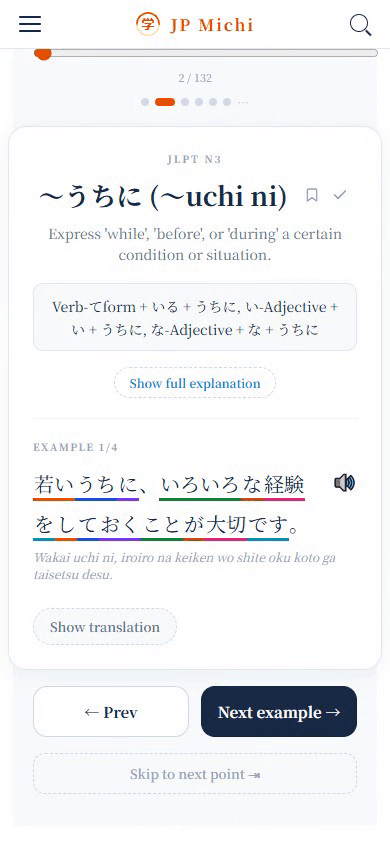
The guided-grammar walkthrough shows その上 and うちに. Each point includes a brief explanation, its formation, and example sentences. Show full explanation opens the longer description; Show translation reveals the meaning of the current example.
Read the short description first. Try identifying the pattern inside the example, then listen and reveal the translation to check your interpretation. Use Next example to examine another sentence or Next point to move to another structure.
- Open Guided Grammar at an available level.
- Read the pattern, short explanation, and formation.
- Open the full explanation if you need more detail.
- Listen to the example and reveal its translation.
- Continue to another example or grammar point.
Use Lessons when you want a sentence breakdown
Open Lessons and select an available lesson. Its sentence cards show Japanese, romaji, a translation, a grammar note, and a vocabulary breakdown. This gives you a place to examine the parts of a sentence together.
Use Listen for the sentence and tap vocabulary entries to hear individual words. Read the grammar note after you have tried the sentence, then return to the Japanese and see whether the structure is clearer. Lessons and Guided Grammar are separate activities; the video above demonstrates Guided Grammar.
- Open a lesson from the lesson list.
- Try reading one Japanese sentence.
- Check its reading, translation, grammar note, and vocabulary.
- Use the audio controls, then move to the next sentence.
Listen to the first two lines of a conversation
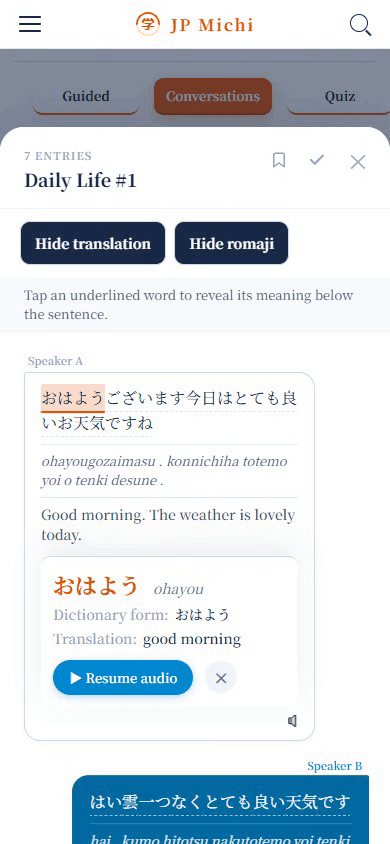
Open Conversations and choose an available topic. Unlike the JLPT-level activities, these conversations are grouped by situations such as daily life. The video opens Daily Life #1, an exchange beginning with a greeting and a comment about the weather.
Open a conversation card to see the speakers and their turns. Show translation and Show romaji let you add reading support. Tap a speech bubble to play from that point, and tap an underlined word to inspect its meaning.
- Choose a topic and open a conversation.
- Try reading the first exchange.
- Turn on translation or romaji as needed.
- Tap a bubble to listen from that turn.
- Tap an unfamiliar underlined word to inspect it.
Check your understanding with practice
The grammar area includes Practice Quiz, and Conversations has its own quiz activity. Use a quiz after examining the relevant material so you can compare what you understood with the answer feedback.
You can also return to Discover for a mixed session. Its review interlude draws on cards encountered during that session. That review is a different activity from the dedicated grammar and conversation quizzes.
Can you follow the exchange a second time?
Go back to the first exchange in the conversation. Hide the translation and listen again. Can you hear where the greeting ends and the comment about the weather begins? Tap either line to play it once more.
Finish by revisiting a sentence with fewer hints. If you still need the translation or romaji, keep using it while you work through the sentence. The goal for that session can simply be understanding a little more of what you are reading and hearing.